
Dodge Viper Gen III License
Plate Frame and Back Plate Assembly
©
Part #
ACC-972027 (coupe) & ACC-972029
(convertible)
INSTALLATION INSTRUCTIONS
Included:
1 x Chrome License Plate Frame, 4 x Chrome plastic nut caps,
1 x High Polished Stainless Steel back plate.
Will Need: 4 x License plate bolts, small tube of adhesive
clear silicone.
-
Place your state
license plate behind and inside the chrome frame provided. Now
set off to the side. You will mount this to your car last.
Remove protective liner on the back plate.
-
Carefully
position the back plate (without scratching the paint) inside the
license plate well. The back of the well trim plate has
protective material so it will not scratch your cars paint.
Hold it in place while you put the frame with the license plate into position on top of the back plate. The license plate screws will hold everything in place.
-
Now hold both
pieces in position lining up the two mounting holes at the top of
the frame with the holes in the back plate. Insert your own license
plate bolts finger tight on both sides. Then tighten each side with
one turn of the screw driver. Note: Tightening too much can
damage your parts.
- Put a small glob of silicone inside each of the two chrome caps. Then press the caps on to the top of the bolt heads. Let dry for one hour.
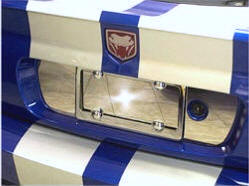
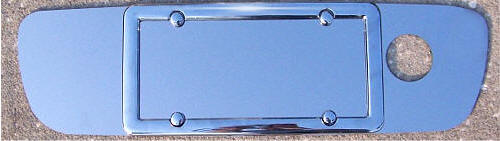

State
License plate not included in picture.
For questions
contact:
admin@TheViperStore.com
TheViperStore.com a
HotCarAccessories.com website
13 copyright